

Most promotional campaigns fail not because discounts are too small, but because the urgency feels manufactured. When visitors believe a deal will wait until next week, they leave—and rarely return.
To bridge this gap, you need limited-time offers that pair genuine value with true scarcity. Whether deploying 4-hour flash sales or 30-minute welcome windows, the objective is to drive an immediate decision.
For those seeking efficiency, tools like Alia can automate these intelligent triggers, ensuring your urgency is as effective as it is authentic.
In this article, we’ll cover:
- Proven limited-time offers that trigger immediate action
- Our proprietary framework for implementing scarcity without annoying your customers
- How to balance value and urgency to maximize ROI
Ready? Let’s go.
TL;DR
- The Cascade Method: Match urgency intensity to visitor engagement rather than showing the same offer to everyone.
- Flash Sales: Peak performance occurs mid-week (Tuesday–Thursday) with windows lasting 4–12 hours.
- Personalized Timers: Implement 15–30 minute individual session clocks to drive immediate, same-session purchases.
- Visual Triggers: Use high-contrast colors like Red/Orange on countdown timers to create psychological tension.
- Inventory & Access Scarcity: Combine stock-level badges with VIP early access to reward loyalty and trigger visceral FOMO.
- Tech Stack: Alia’s Smart Triggering automates A/B testing and optimizes timing based on real-time behavior.
Why Limited-Time Offers Work (The Psychology)
It comes down to loss aversion. Psychologically, the pain of missing out on a deal is twice as powerful as the pleasure of gaining the discount itself.
When you attach a hard deadline to an offer, you shift the customer's brain from "Should I buy this?" (logic) to "I don't want to lose this chance" (emotion).
This isn't manipulation—it's meeting customers where they already are. Most shoppers intend to buy "eventually." A deadline simply converts intention into action.
Flash Sales (Under 24 Hours)
Flash sales are the heavy hitters of urgency marketing. Because the window is so short (usually 4–12 hours), the "Fear Of Missing Out" (FOMO) is at its peak.
Example #1: JOI’s Minimalist Urgency Popup
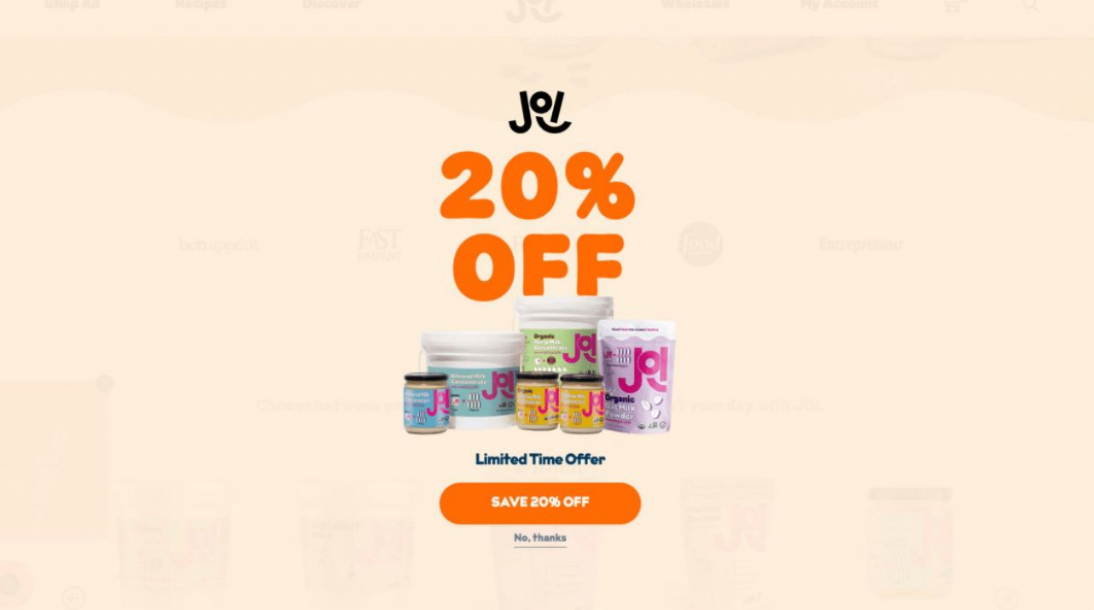
JOI (Just One Ingredient) uses a clean, high-contrast popup that creates urgency while maintaining a premium brand aesthetic. By pairing a bold discount with a "limited time" trigger, they convert browsers into buyers without visual clutter.
The Result:
- 15.4% email opt-in rate.
- 36% increase in email sign-ups compared to their previous popup.
- 21% purchase rate after signup.
- 15% increase in email-driven revenue.
Read more about their case study here →
Why It Worked: The high-contrast orange palette draws immediate attention to the 20% OFF value proposition, while the "Limited Time Offer" messaging triggers FOMO and encourages immediate action.
Example #2: Urban Smokehouse's 30-Minute Personal Timer

Urban Smokehouse took the flash sale concept and applied it to individual user sessions. They implemented a floating button that triggered a 30-minute discount expiration timer once clicked.
The Result:
- 20% same-session purchase rate
- Over $100,000 in additional monthly sales
- 9.5% overall signup rate
Read more about their case study here →
Takeaway: You don't need a sitewide event to run a flash sale. You can run a "personal flash sale" for every single visitor. The timer starts when the visitor engages—creating urgency that feels personal rather than manufactured.
How to implement flash sales:
- Optimal Duration: 4–12 hours for sitewide sales; 15–30 minutes for personal timers.
- Best Timing: Tuesday–Thursday, 10 AM – 2 PM EST (when people are procrastinating at work).
- Messaging: "Flash Sale: [Discount]% off — Ends at [Specific Time]."
One-Day Offers
A "single day event" is another powerful time frame for limited-time offers. Choose to run your campaign from any time period, ranging from just a few hours to a full 24-hour period. There's still urgency involved, but customers will feel a little less pressure than when they're confronted by a countdown timer.
Example #3: Bibado's Single-Day Interactive Upsell
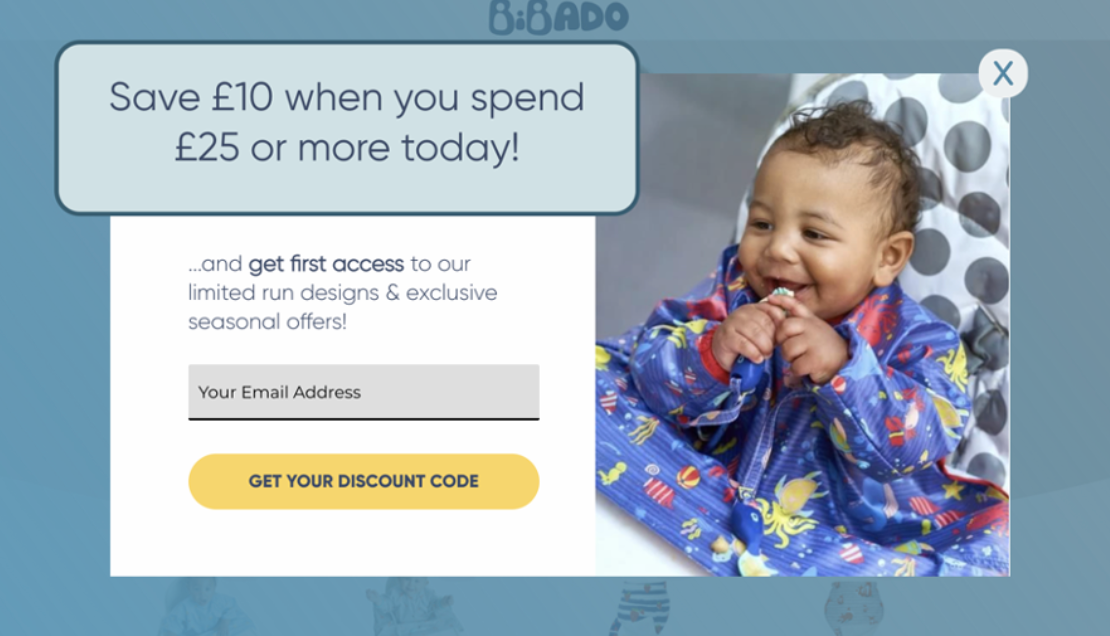
Bibado, a childcare ecommerce brand, uses a similar idea with their "Save £10 when you spend £25 or more today!" offer. The one-day time limit encourages customers to make a purchase right away, while the spend threshold nudges them toward a higher cart value.
This approach works because it combines two motivators: the urgency of a single-day window and the incentive to hit a minimum spend. It's especially effective for brands with lower-priced items where increasing AOV is a priority.
Why it works:
- The 24-hour window creates urgency without feeling aggressive
- A spend threshold naturally increases average order value
- Daily rotation keeps customers returning to check for new offers
- Works well for product categories where repeat purchases are common
How to implement one-day offers:
- Pick a cadence: Run daily deals consistently (e.g., every Tuesday) or as occasional surprises to keep shoppers engaged.
- Rotate products: Feature a different product or category each time to expose customers to your full catalog.
- Pair with thresholds: Combine the daily deal with a minimum spend requirement to boost AOV.
- Promote early: Announce the deal via email or SMS in the morning so customers have the full day to act.
Countdown Timer Campaigns
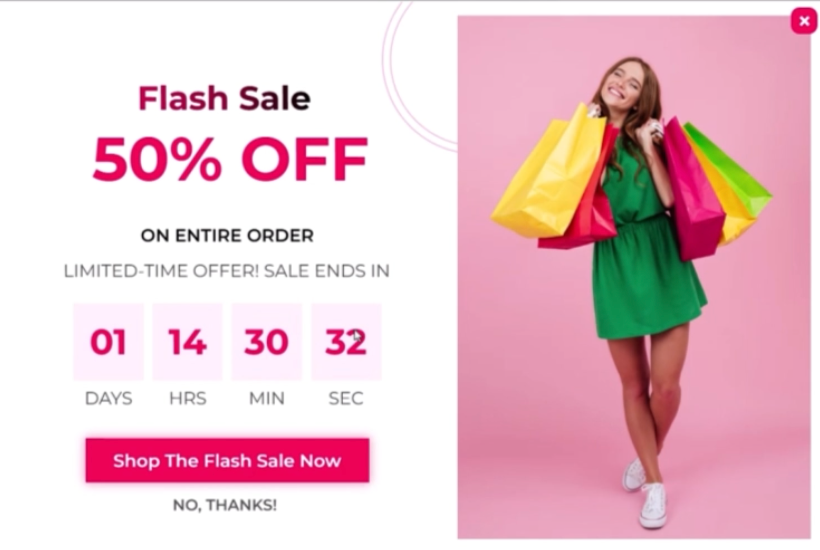
A countdown timer isn't an offer itself—it's the visual engine that drives the offer. However, where you put it matters.
Countdown timers work because they create visual tension. The sight of numbers ticking down, second by second, is one of the most effective psychological triggers for immediate action.
Where to place timers
- Exit-Intent Popups: Place a 15–30 minute countdown inside your exit-intent popup. This gives users a tangible reason to complete their action now rather than "coming back later" (which they rarely do).
- Email Campaigns: Embed dynamic countdown timers inside sale emails. A ticking clock in the inbox creates immediate tension and drives higher click-through rates.
- Pre-Launch Pages: Use 24–48 hour countdowns on password-protected pages to build hype for new drops.
How to implement countdown timer campaigns:
- Duration: Set popups to 15–30 minutes; set email campaigns to 24–48 hours.
- Visuals: Use high-contrast colors (Red/Orange) for the digits.
- Placement: Test the timer in the sticky header vs. the popup.
Alia Pro Tip: Use Alia’s Automated A/B Testing to see if a 15-minute timer outperforms a 30-minute one. The AI will automatically shift traffic to the winning variant.
Read more: Popup Timing & Triggers: When to Show Your Offers
Seasonal & Holiday Campaigns
When you need to capitalize on natural urgency, seasonal sales are your best friend. They have a built-in expiration date that customers already know—no need to manufacture scarcity.
Example #4: Ekster's Holiday Sale
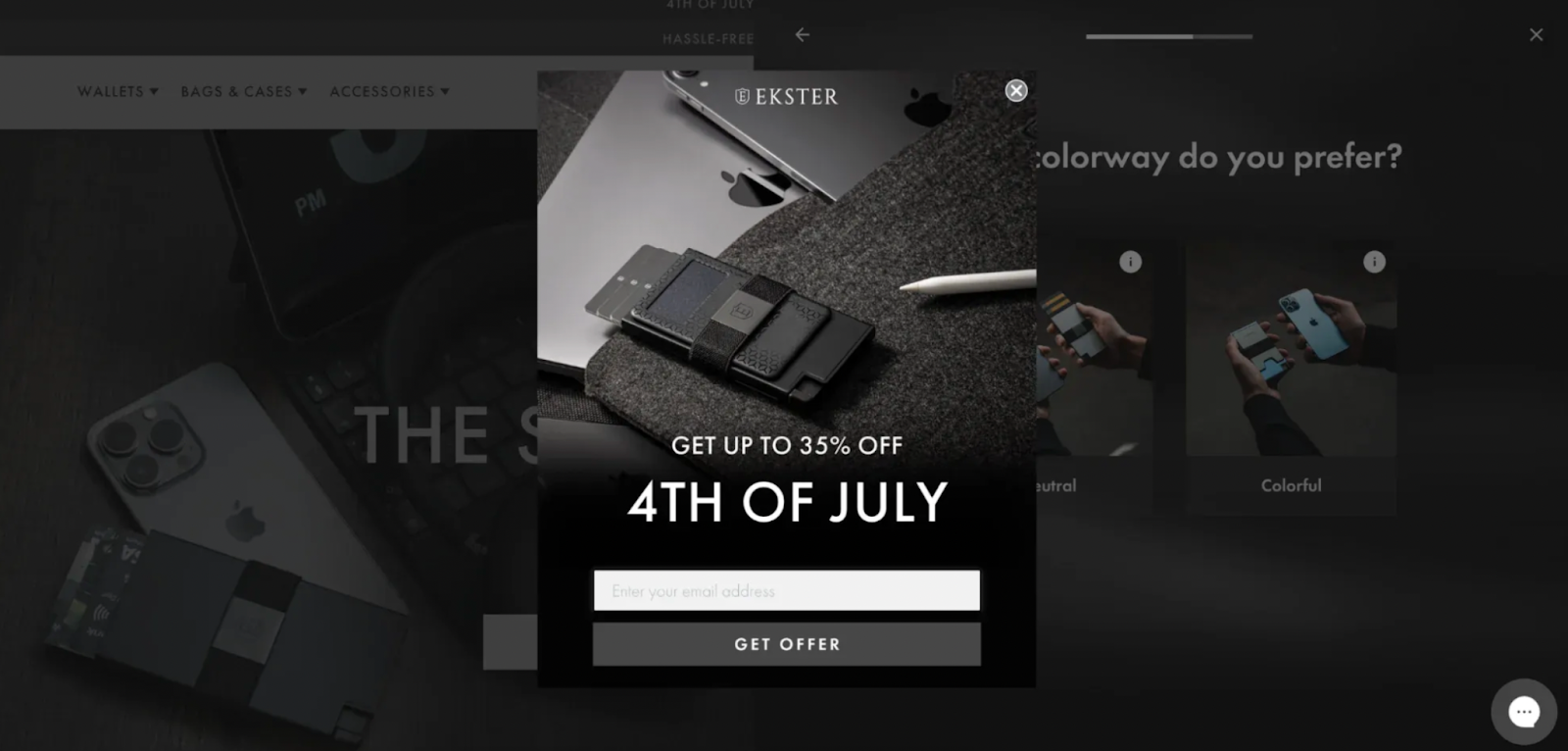
Ekster announces the 4th of July sale with a cool-looking popup. The discount is generous and the offer is quite tempting, making it an excellent example of holiday-specific urgency.
Example #5: Halloween Seasonal Sale
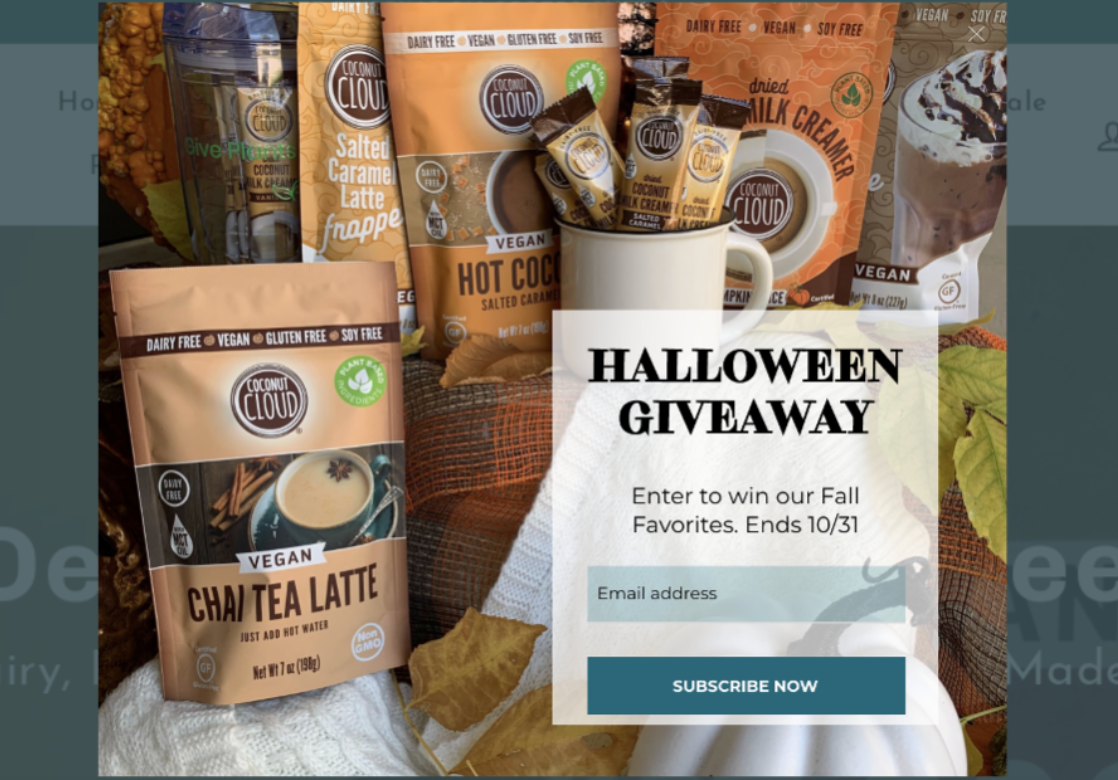
Halloween is one of the most underused seasonal opportunities outside of BFCM. Whether your brand sells costumes or not, the holiday offers a natural excuse to run themed promotions that stand out in a crowded inbox.
The key is leaning into the seasonal aesthetic while keeping your offer structure sharp. For this sample, a popup that says "Halloween Giveaway, enter to win and ends in 10/31” with a photo of what they’re getting immediately tells the customer what they would win, when it expires, and why it's happening now.
Why Halloween campaigns work:
- Built-in theming makes creative execution easy and eye-catching
- Less competition than BFCM, meaning your offer has a better chance of standing out
- Can help increase sales (many shoppers are more likely to buy on holidays)
- Clear your inventory to make way for new products
- Takes advantage of existing customer shopping mindset during holiday periods
How to implement:
- Choose a holiday that aligns with your brand or target audience
- Segment your audience: offer a bigger incentive to first-time visitors and a loyalty perk to returning customers
- Make unique discount codes
- Create sales promotions to maximize engagement across multiple channels
- Design holiday-themed visuals that capture attention
Alia Pro Tip: Use Alia's real-time segmentation to show different Halloween offers based on visitor behavior. A first-time browser might see "Trick or Treat: Unlock a Mystery Discount," while a returning visitor with items in their cart gets "Your Cart is Haunted — 15% Off if You Check Out in 20 Minutes."
Related read: Steal These 9 Black Friday Popup Ideas & Templates
Sitewide Offers
A sitewide discount is the simplest way to drive broad sales by removing friction—everything is on sale, no hunting required. Display these prominently via announcement bars, website sliders, or dedicated landing pages to convert high-intent traffic from ads and social media.
Example #6: Overstockart.com's Sitewide Sale
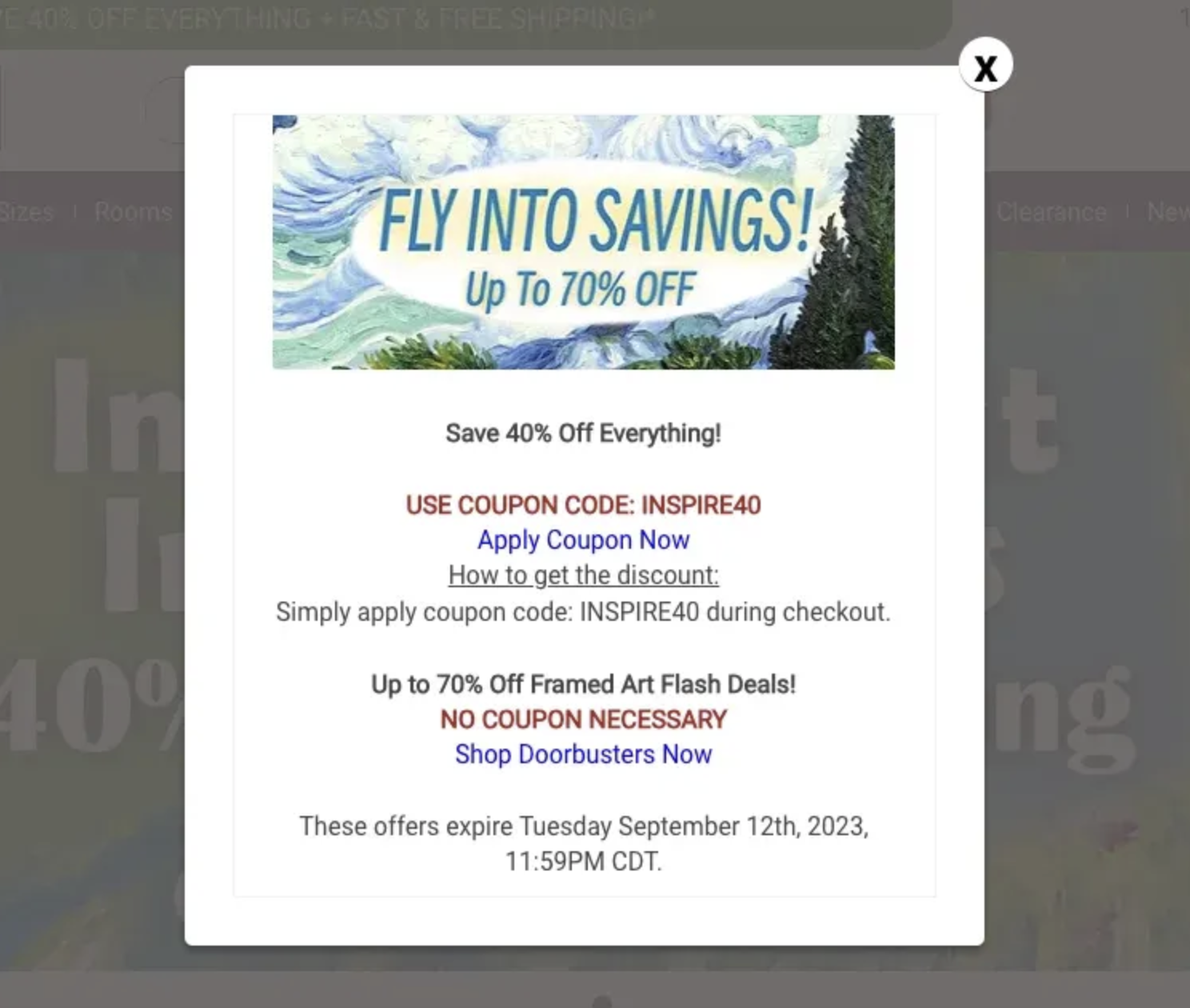
Overstockart.com, a retailer of handmade oil paintings, gives a 40% discount on everything plus additional perks through a sitewide sale with a coupon code.
Why this limited-time deal idea is effective:
- Helps sell overstocked inventory
- Increases customer engagement
- Encourages customers to browse more products
How to implement:
- Create a discount code for the offer to be applied during checkout
- Provide links to the discounted products in sale promos
- Promote the sale across email, social media, and on-site banners
- Set a clear end date to create urgency
Takeaway: A sitewide sale is an excellent limited-time offer idea, especially for retailers with diverse product catalogs. It simplifies the shopping decision by removing the need to hunt for specific deals while moving inventory efficiently.
First-Purchase Incentives (Welcome Offers)
The "Welcome Offer" is the most common limited-time offer, but most brands do it wrong. They give a code that never expires. To drive sales, that code needs a deadline.
The Delayed Trigger Approach
Instead of showing a popup immediately, wait until visitors demonstrate engagement:
- 45-second delay: Only discount engaged visitors who've spent time browsing
- Scroll-based trigger: Show the offer after 50% scroll depth
- Page-view trigger: Activate after 2+ page views
This ensures you're not giving discounts to visitors who would have bounced anyway.
Example #7: Create’s Data-Driven Welcome Offer
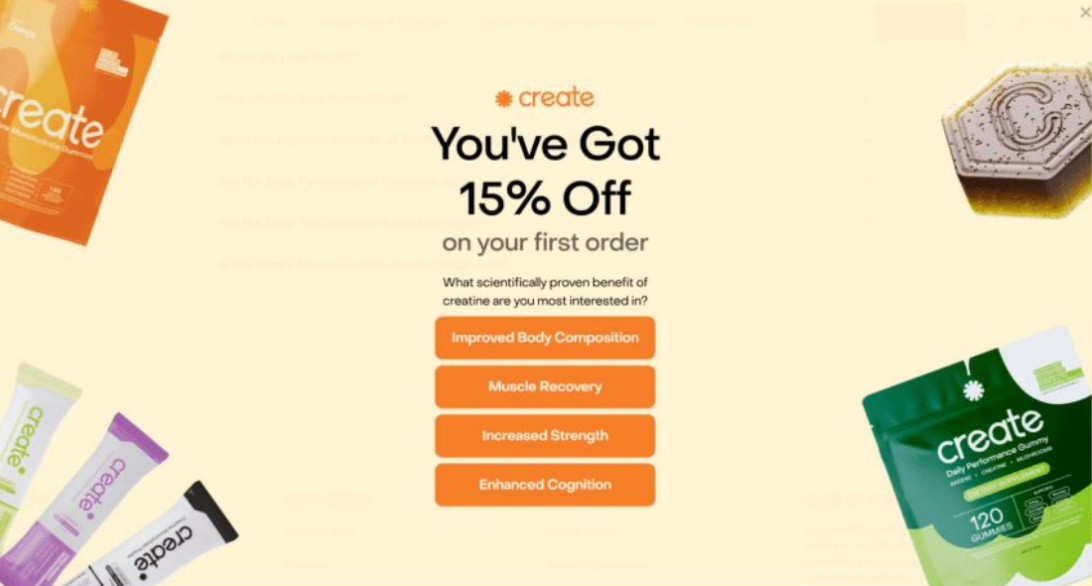
Create offers new visitors a first-purchase discount while simultaneously collecting preference data to segment their audience. By asking users about their specific fitness goals, they build credibility while tailoring the shopping experience.
The Result:
- 18% email sign-up rate, marking a significant jump from previous rates.
- 200% increase in sign-ups captured through optimized landing page popups.
- Improved segmentation for more targeted and relevant welcome flows.
- Strong engagement driven by a personalized, intent-based opt-in flow.
Read more about their case study here →
Why It Worked: The popup asks a single, high-impact question about specific "scientifically proven" benefits. This creates an interactive experience that makes the discount feel earned while giving the brand the data needed to personalize future marketing.
Related read: Boosting Customer Engagement With Interactive Content
Bundle & BOGO Offers
Bundles and Buy One, Get One (BOGO) deals are powerful tools to increase Average Order Value (AOV) while giving customers the satisfaction of "getting a steal". When these offers are combined with a strict time limit, they become even more effective.
Example #8: Blume’s Birthday BOGO
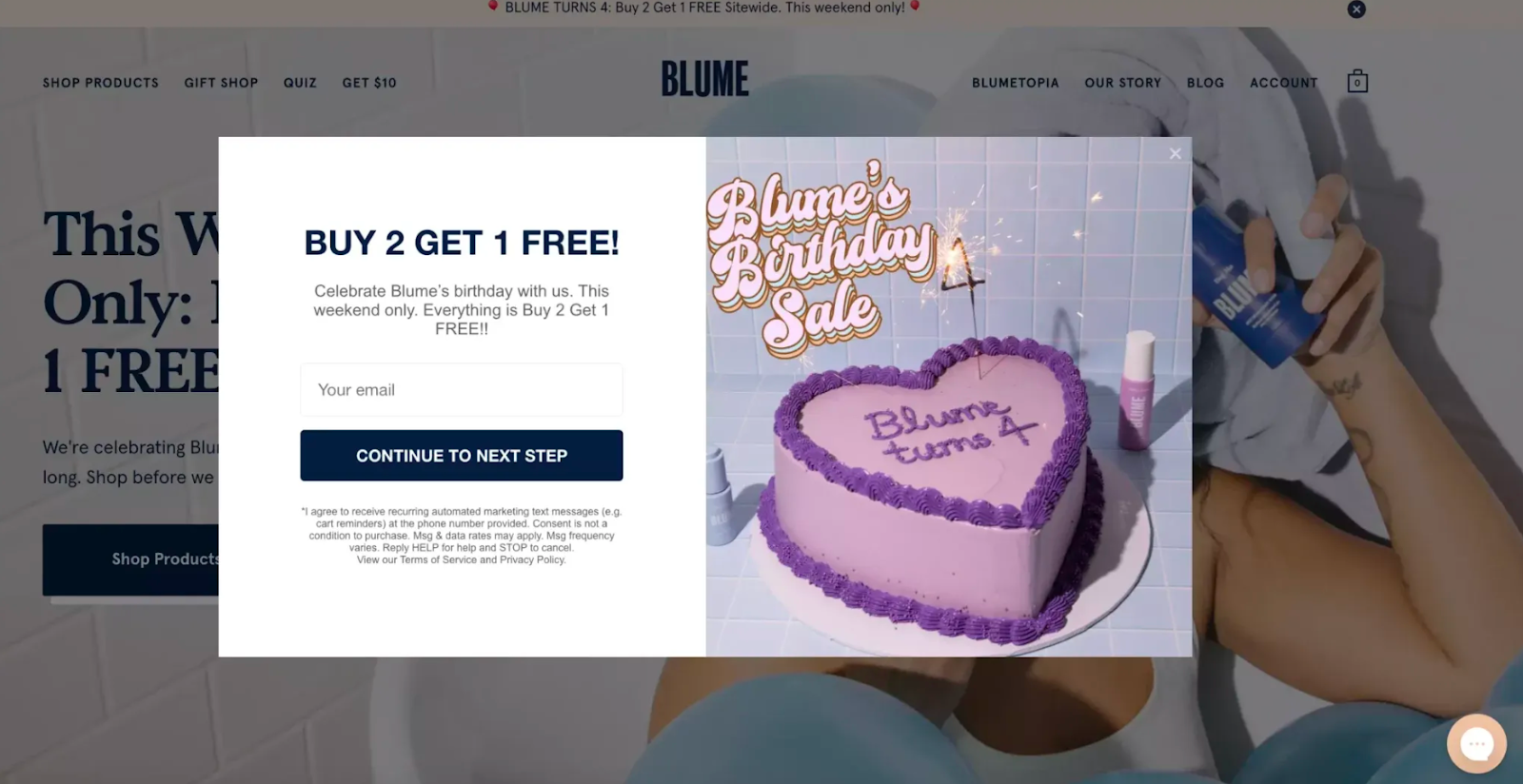
Blume utilizes a "Buy 2 Get 1 Free" sitewide offer to celebrate their brand anniversary. By framing the discount as a birthday celebration that lasts "this weekend only," they create a sense of community and urgent exclusivity.
Why it works
- Bundles and BOGO deals increase average order value by requiring multiple items for a discount.
- Customers often perceive a free product as more rewarding than a simple percentage off.
- Combining these offers with short windows forces immediate decision-making.
- This strategy helps move inventory quickly while maintaining a positive customer experience.
How to implement
- Use celebratory imagery in popups to create an event-like feel.
- Require an email or phone number to unlock the deal to grow your marketing list.
- State the duration and scope clearly to prevent confusion and build urgency.
- Use interactive tools to suggest bundles during the user flow to reduce friction.
- Send a promotional alert 24 hours before the event to build anticipation.
The "Popup Conversion Cascade" Framework
Most brands treat all visitors the same. This is a mistake. Analysis of successful Shopify stores reveals that the highest-converting offers use a "cascade" approach—matching the intensity of the offer to the engagement level of the visitor.
Stage 1: The "Soft" Awareness (0–30 Seconds)
Who: First-time visitors just landing on the site.
The Offer: Soft urgency. Don't slap them with a discount immediately.
The Tactic: Focus on value, education, or mystery.
Example: "Unlock a mystery perk" or "Join 10,000+ happy customers."
At this stage, you're building trust—not pushing for a sale.
Related read: The Ultimate Guide to Customer Education on Your E-Commerce Site
Stage 2: The "Hook" (30+ Seconds / 2+ Page Views)
Who: Visitors who are browsing but haven't added to cart.
The Offer: Medium urgency. Reveal the specific discount.
The Tactic: Introduce a countdown timer.
Example: "Get 10% off—offer expires in 30 minutes."
Implementation: Set the trigger to fire only after the user has scrolled 50% down a collection page or viewed multiple products.
Stage 3: The "Save" (Exit Intent)
Who: Visitors moving to leave the site.
The Offer: High urgency. This is your last shot.
The Tactic: Stack the value.
Example: "Wait! Take 15% off + Free Shipping if you finish in the next 10 minutes."
Exit-intent detection gives you one final opportunity to convert a visitor who would otherwise be lost.
Learn more: How to Create Engaging Popups Without Annoying Your Customers
Common Mistakes to Avoid in Making Limited Offer Popups
1. Fake Urgency
If your "limited-time" offer is always running, customers will notice. The boy who cried wolf doesn't convert. Save urgency for offers that genuinely have a short window.
2. Vague Deadlines
"Offer ends soon" doesn't trigger action. "Ends in 3 hours" or "Valid until Sunday at midnight" does. Specificity creates believability.
3. Showing the Same Urgency to Everyone
A first-time visitor and a returning customer with items in their cart need different approaches. Use the cascade framework—match urgency intensity to engagement level.
4. Forgetting Mobile
More than half of ecommerce traffic is mobile. Make sure your countdown timers, popups, and urgency messaging work seamlessly on smaller screens.
5. Not Testing
Different timing, audiences, and formats can drastically change results. What works for one brand may not work for yours. Test countdown lengths, trigger timing, and offer types.
Related read: Why Alia Is 3× More Effective Than Even the Highest-Converting Popups
Stop Losing Sales to "Maybe Later"
The difference between a generic sale and a high-converting campaign is the shift from offering a discount to justifying it with urgency. Whether it’s a 4-hour flash sale or a 30-minute welcome gift, the deadline must be clear, visible, and authentic.
- Match the Urgency: Use the "Cascade" method to personalize offers—showing different incentives to new browsers versus exiting visitors.
- Time It Right: Target mid-week windows (Tuesday–Thursday) for flash sales to capture customers in a peak buying mindset.
- Automate the Friction: Use a tool that auto-applies discount codes so users don't have to copy-paste.
Launch Your Campaign in Minutes
To implement these strategies without the technical overhead, Alia Popups is built natively for Shopify with pre-built templates for countdown timers, exit-intent triggers, and personalized flows.
Its AI-driven Smart Triggering optimizes timing based on visitor behavior, ensuring your urgency is deployed at the optimal moment. Plus, you can add it on Shopify in under 10 minutes.